The PS1 controller is a piece of gaming history — and in 2026, people still want one, just for different reasons than they did in 1994. Some want a USB remake to play emulated classics on PC, some want an adapter to plug an original pad into a modern machine, and some want to collect the real thing. The key thing to understand before you spend anything is that there are actually two different PS1 controllers, and "PS1 controller" today usually means the DualShock. Here is everything you need to know, with real current prices.
Know the two PS1 controllers
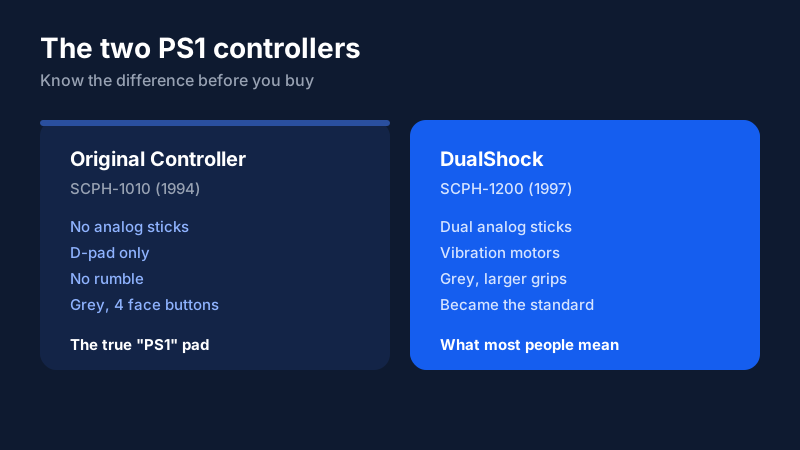
The original PlayStation shipped in 1994 with a pad that had no analog sticks and no rumble — the PlayStation Controller (SCPH-1010), a simple digital pad with a D-pad and four face buttons. In 1997 Sony replaced it with the DualShock (SCPH-1200), which added dual analog sticks and vibration, and that design became the template for every PlayStation controller since. When people search for a "PS1 controller" today, they almost always mean the DualShock — but if you are collecting, the earlier no-stick pad is the one that actually says "PlayStation" and matters to purists.
Option 1: USB remake controllers (easiest for PC)
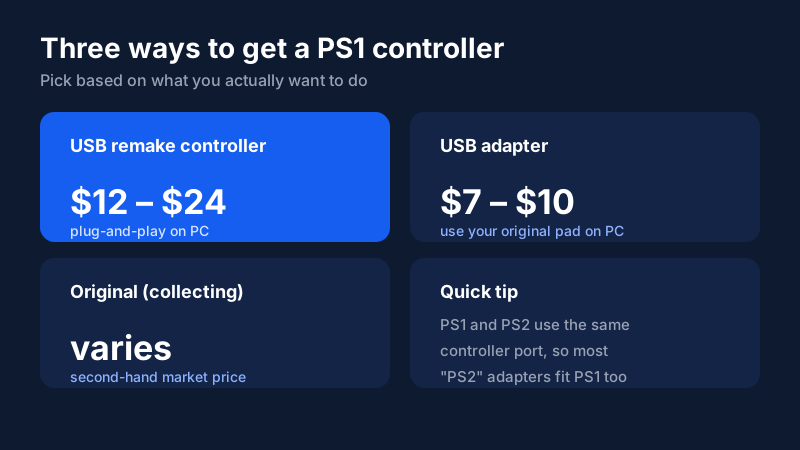
If you just want to play, a USB remake is the path of least resistance. These are third-party pads styled after the classic controller but wired straight to USB, so they plug into a PC, laptop, or Raspberry Pi with zero setup. On Amazon they run roughly $12 to $24, with two-packs available for a bit more. They work with emulators like RetroArch, DuckStation, and ePSXe out of the box, and the better ones include dual analog sticks and vibration so they feel close to the original DualShock.
The trade-off is build quality. These are budget controllers — the plastics and stick feel are below a modern DualSense, and you will not get haptic feedback. For emulation and nostalgia they are ideal; for anything competitive, they are not. If you want the authentic shape and plug-and-play convenience without hunting down vintage hardware, this is the option to pick.
Option 2: PS1-to-USB adapters (use your original pad)
If you already own an original PS1 or PS2 controller, you do not need to buy a new pad at all — you need a PS1/PS2-to-USB adapter. These little dongles plug the old controller's port into USB, and they cost just $7 to $10 on Amazon, with two-packs around $9. Because the PS1 and PS2 use the same controller port, one adapter handles both. This is the cheapest way to get an authentic pad working on a PC, and it is the right call if you have a working original sitting in a drawer.
The one thing to check is driver support. Most modern adapters are plug-and-play on Windows and work with emulators without extra software, but a few cheaper models need a driver or only map the D-pad. Look for an adapter that explicitly lists vibration support and "no driver required" to avoid the cheap units that skip the analog sticks.
Option 3: Collecting the original
For collectors, the original hardware is the point, and value depends heavily on model and condition. A clean, working DualShock is the most common find and the most affordable entry point. The earlier Digital Controller and any boxed, sealed examples are rarer and command higher prices on the second-hand market. If you go this route, buy from a seller with clear photos and a return policy, and verify the controller is genuine rather than a reshelled or aftermarket pad — the collectible market has plenty of both.
Just be honest with yourself about why you are buying. If you want to play games, a $12–$24 USB remake or a $7 adapter beats chasing vintage hardware on price and reliability. Collecting an original is a fun hobby, but it is a different goal than getting a controller that works.
Spotting a genuine original
If you go the collecting route, knowing how to tell a real pad from a knockoff saves you money and frustration. Genuine Sony controllers have a clean, slightly recessed PlayStation logo, even seam lines, and a model number (SCPH-1010 or SCPH-1200) molded into the back label. Aftermarket and reshelled pads often have slightly off logo printing, mismatched screw types, or a texture that feels wrong in the hand. The most reliable tell is the back sticker: a genuine DualShock carries Sony's SCE branding and a matching serial, while clones frequently miss or smudge this label. Buy from a seller with clear photos and a return window so you can check these details in person.
Compatibility, in a nutshell
A few quick rules tie the whole thing together. The PS1 and PS2 share a controller port, so original pads and most "PS2" adapters are interchangeable. Original PSX pads do not connect natively to the PS4 or PS5, so keep them for PC use via a USB adapter. And if your only goal is playing classic games on a modern PC, the USB remake is the simplest, most reliable path — no adapters, no drivers, no vintage hardware to hunt down.
Setting it up for emulation
Once you have a pad or adapter in hand, the software side is quick. Windows recognizes most USB remake controllers and adapters as a standard gamepad, and the popular PS1 emulators — DuckStation, RetroArch, and ePSXe — map the buttons automatically. The one step worth doing is opening the emulator's controller settings and confirming the analog sticks and vibration are detected, since a few cheap adapters default to digital-only mode. With DuckStation in particular, the automatic mapping is excellent, so you can typically be playing within a minute of plugging the controller in.
Bottom line
The right PS1 controller depends entirely on what you want to do. To play on PC, buy a USB remake ($12–$24) — it is plug-and-play and cheap. If you already own an original pad, buy a USB adapter ($7–$10) instead. And collect the original only if you care about the hardware itself, not just playing games. Match your goal to the option and you will get exactly what you need without overspending. Check current prices below to grab the right one.
Frequently asked questions
Is the PS1 controller the same as the PS2 controller?
They use the same controller port, so they are interchangeable — a PS2 DualShock 2 works on a PS1, and a PS1 DualShock works on a PS2. The only exception is the very first PS1 pad, which had no analog sticks. For most practical purposes they are the same connector.
How can I use a PS1 controller on a PC?
Two ways. Buy a PS1/PS2-to-USB adapter (about $7–$10) to plug your original pad into a PC, or buy a USB remake controller ($12–$24) that connects directly. Both are plug-and-play for emulators like RetroArch and DuckStation.
What is the difference between the PS1 controller and the DualShock?
The original PS1 controller (SCPH-1010, 1994) had no analog sticks and no rumble. The DualShock (SCPH-1200, 1997) added dual analog sticks and vibration, and became the standard. Most people searching for a "PS1 controller" actually mean the DualShock.
Are USB remake PS1 controllers any good?
For emulation and casual play, yes — the well-reviewed ones are comfortable and cheap. But they are budget pads: build quality and stick feel are below a modern DualSense, and you will not get haptic feedback. They are best for nostalgia and emulation, not competitive play.
Are original PS1 controllers worth collecting?
For collectors, yes, but condition and model matter. Boxed, working DualShock controllers and the rarer original Digital Controller hold value. If you just want to play, a $12–$24 USB remake or a $7 adapter is far better value than hunting down an original.
Do PS1 controllers work on the PS4 or PS5?
Not natively. The PS4 and PS5 use USB or Bluetooth, not the old PSX port. You can get adapters that translate the old controller to modern consoles, but the result is clunky. The PS1 pad is best used on PC via a USB adapter, not on modern consoles.
What games are best with a PS1 controller?
Anything from the original library, really. Platformers like Crash Bandicoot and Spyro, RPGs like Final Fantasy VII and Chrono Cross, and racers like Gran Turismo all map perfectly to the DualShock. For emulation, the controller shines with 2D and early 3D games that were designed for the original pad.