
A PS5 stand is one of those accessories that is either essential or completely unnecessary, depending on which console you own. The original PS5 shipped with a stand that does both horizontal and vertical duty. The newer PS5 Slim and PS5 Pro, however, only come with small horizontal feet — if you want to stand them upright, you have to buy a stand separately. Here is what you actually need, how much it costs, and which stand is worth your money.
First, check whether you need a stand at all
The answer comes down to two questions: which model you own, and how you want to place it. If you have an original PS5 and you are happy with the included stand, stop reading — you do not need to buy anything. If you own a PS5 Slim or Pro and want it standing upright, you need a vertical stand. And if you have any model and plan to lay it flat, you do not need a stand, because horizontal placement is supported out of the box on every PS5.
The original PS5's included stand
If you own a launch PS5, you already have a stand — it came in the box and doubles as a horizontal base and a vertical support. The trick is that it rotates between the two modes, and it is easy to misplace the small screw that locks the vertical position. If you have lost the whole stand, you do not need the official replacement specifically: any of the third-party vertical bases designed for the original PS5 will do the same job for less. Just confirm the listing is for the original model and not the Slim, since the footprints differ.
What a PS5 stand costs
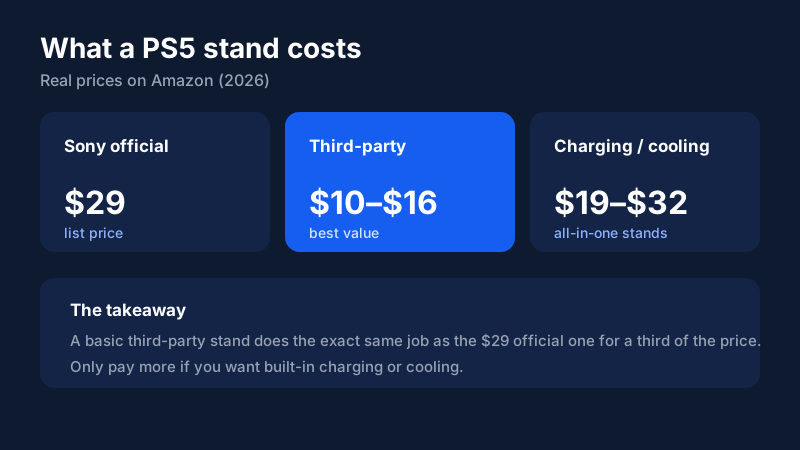
Here is where it gets easy. Sony's official Vertical Stand lists for $29 and fits the Slim and Pro. But a basic third-party stand does the exact same job for $10 to $16 on Amazon — a third of the price. A stand is simply a physical support with no electronics, so there is no performance difference between the official one and a well-reviewed third-party base. The only reason to pay more is if you want extra features like built-in controller charging or a cooling fan, which push the price up to the $19 to $32 range.
Choosing the right type of stand
There are three broad categories, and they serve different buyers. A basic vertical stand is a simple base that holds the console upright, and it is all most people need. An all-in-one charging stand adds dual controller-charging docks alongside the base, which is genuinely useful if your controllers are always dying and you want to tidy up the charging cables. A cooling stand adds a fan, but these are mostly a gimmick — the PS5 already cools itself well, and a third-party fan adds noise without a real temperature benefit.
What to look for in a stand
- Model compatibility: Make sure the stand matches your console. Slim and Pro stands are different from the original PS5 stand, and some are specific to the Disc or Digital variant.
- Stability and grip: A wide, non-slip base is what keeps a tall console from tipping. Look for rubber pads or a screw-mount option for the most secure fit.
- Airflow: Avoid stands that wrap tightly around the sides or block the vents. The best stands hold the console in place while leaving intake and exhaust clear.
- Material: Most stands are ABS plastic, which is fine. A few use metal for a premium feel and extra weight, which improves stability — worth considering if you have a heavy Pro.
Well-reviewed third-party stands
If you want a specific recommendation, a few names consistently rise to the top on Amazon. Pelidox and Karanava sell popular stands for the Slim and Pro — Karanava's is all-metal with a hexagonal base, which adds useful weight for stability. Gmeaou and Glieskir are well-reviewed budget options with simple ABS bases. For an all-in-one setup, NBCP and Rysker combine the vertical stand with dual controller charging, and Rysker adds a fan for those who want it. Any of these will hold your console securely — the differences come down to material, whether you want charging built in, and whether the extra cooling fan appeals to you. For a basic upright stand, the cheaper options are exactly as good as the pricey ones.
Do you need a cooling or charging stand?
The honest answer is that most people do not. The PS5's internal cooling is already well engineered, so a fan-equipped stand is rarely necessary and often just adds noise. A charging stand is more defensible: if you regularly run two controllers flat and want a tidy charging station, an all-in-one stand that holds the console and charges two pads is a legitimate space-saver. But if all you want is to stand the console up, a basic $10–$16 third-party base is the smart buy, and you can skip the extras entirely.
Horizontal vs. vertical: does it matter?
Functionally, no — a PS5 runs the same whether it is flat or upright, as long as the vents are clear. The choice is purely about space and aesthetics. Vertical placement saves shelf width and looks striking, which is why it is popular, but it makes the console taller and easier to tip if bumped. If you have kids or pets, horizontal with the included feet is the safer bet and requires no extra purchase at all. Buy a stand only if you genuinely prefer the upright look and have a stable, out-of-the-way spot for it.
Bottom line
For most PS5 owners the decision is simple: if you have a Slim or Pro and want it vertical, buy a basic third-party stand for $10 to $16 — it matches the official $29 stand for a fraction of the price. Only reach for an all-in-one stand if you specifically want controller charging, and skip the cooling-fan models entirely. A stand is the kind of accessory where paying more gets you very little, so keep it simple and spend the savings on a game instead. Check current prices below to grab a stand that fits your console.
Frequently asked questions
Does the PS5 come with a stand?
It depends on the model. The original PS5 (2020) shipped with a stand that works for both horizontal and vertical placement. The PS5 Slim and PS5 Pro only include small horizontal feet — if you want to stand them upright, you have to buy a vertical stand separately.
How much is the official PS5 stand?
Sony's official Vertical Stand lists for $29. It works with both the Slim and Pro. In practice, a basic third-party stand does the same job for about $10 to $16, so you rarely need to pay the full $29.
Do I need a stand for my PS5?
Only if you want to place the console vertically and you own a Slim or Pro, or if you lost the original stand that came with the launch PS5. If your console sits horizontally, you do not need a stand at all.
Are third-party PS5 stands safe?
Yes. A stand is just a physical support — it does not touch the electronics. Any stable base with a non-slip bottom and a secure fit for your model is safe. Just make sure you buy one that matches your console (Slim/Pro vs. original) and that it does not block the air vents.
Are cooling stands worth it?
Mostly no. The PS5's built-in cooling is already well designed, and a third-party fan adds noise without meaningfully lowering temperatures. If you want a stand with extra features, a controller-charging stand is more useful than a cooling one.
Does the PS5 stand affect airflow?
Only if it blocks the vents. A good stand keeps the console stable while leaving the intake and exhaust clear. Avoid stands that wrap tightly around the sides or sit directly over the bottom vents.
Will any PS5 stand fit any model?
No. Stands are model-specific. The original PS5, the Slim, and the Pro have different footprints, so a stand made for one will not securely hold another. Some stands also differ between the Disc and Digital editions, because the drive changes the console's width. Always check the listing matches your exact model before buying.
Can I install the stand myself?
Yes. Installing a stand takes under a minute — you either snap the base on or secure it with a single screw, depending on the model. No tools are required beyond the screw that comes in the box.